For shops in Israel
“How much was it again?”
You won't have to wonder.
The price of every product, what you owe each supplier, what's left in the till. It's all there, up to date, in your pocket — and Sarah answers when you ask.
14 days on us · No credit card · Then ₪99 a month
Your documents
It knows the paperwork you get here.
The type of document is recognised from its title — חשבונית מס, חשבונית זיכוי, קבלה, דוח Z. The supplier is recognised by their business number (ח.פ), not by the way the name happens to be spelled. Agorot rounding (עיגול אגורות) is read with its sign. And every word is copied letter by letter, never swapped for a product that would look more plausible.
Your files
Your originals stay with you.
Every document is filed in YOUR Google Drive: a folder named after the supplier or the customer for your invoices, separate folders for Z reports, credit notes (זיכוי) and payslips — all created on their own. The app only ever sees what it filed there itself: not your photos, not your other folders, not your mail. The day you leave, there is nothing to take back.
The counter
Made to be used standing up, one hand on your phone.
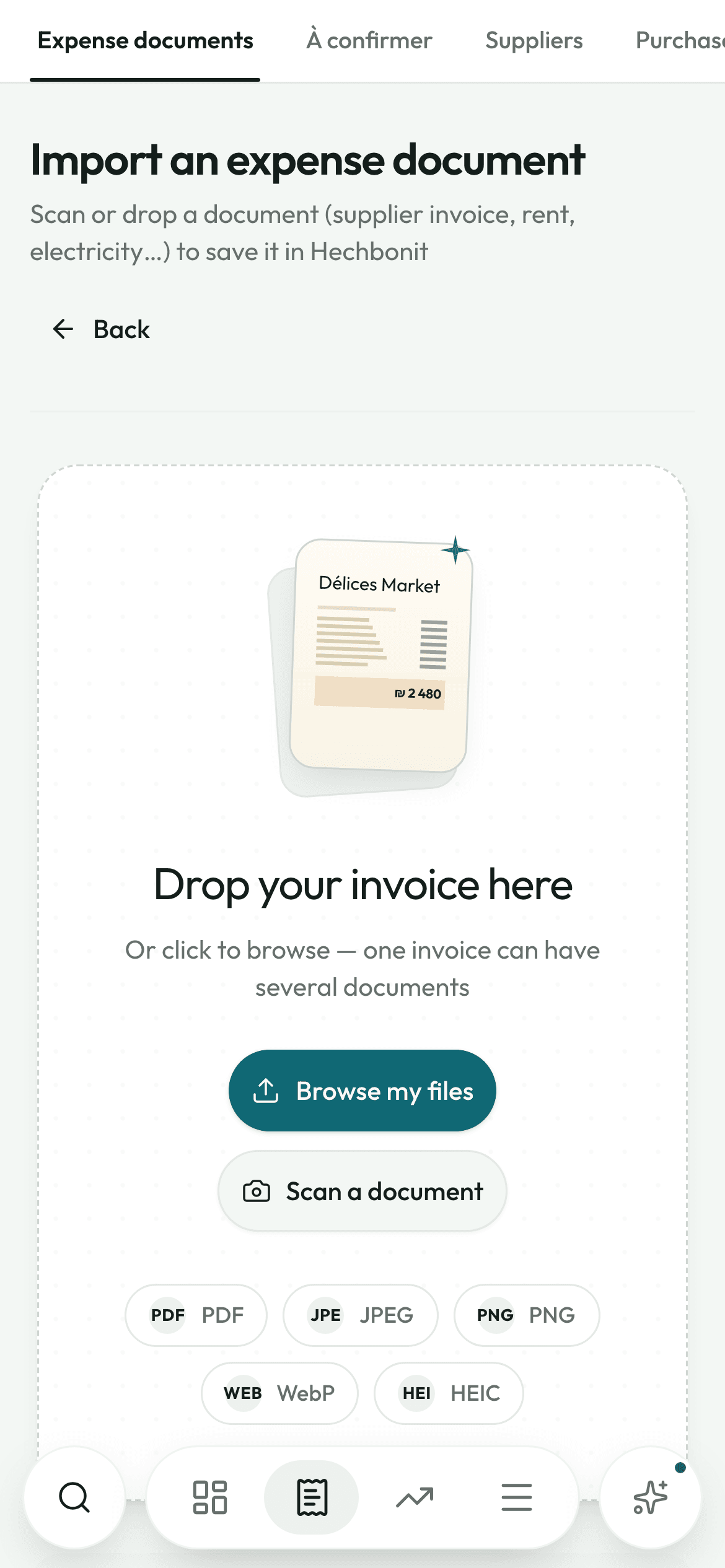
The scanner opens the camera, puts the four corners in place and straightens the page. Send twenty invoices one after another without waiting: it keeps reading even if you close the app to serve a customer. You confirm afterwards, at your own pace.
The same three moves, every time
This isn't software you have to learn.
It's a move you repeat.
- Step 1
You take the photo
The scanner opens the camera, places the four corners on its own and lets you nudge them with your finger, with a magnifier that follows your thumb. Several pages make a single document.
- iPhone photo, Android scan, PDF, screenshot: it all goes through
- The document goes into the “To confirm” queue and the screen clears for the next one
- It keeps reading even if you leave the app to serve a customer
- Step 2
Sarah reads, you check
One screen at a time — Supplier, Details, Lines, Totals — with the document shown above it. The supplier, the number, the date and the totals each carry a dot: reliable, worth a check, unsure.
- Anything she corrected on her own shows up in green
- A magnifier enlarges every name and every amount: a product name, a price, a total
- Nothing is saved unless you approve it
- Step 3
It's filed, and everything updates
The original goes into your Google Drive, in that supplier's folder. At the same moment: their balance, the due date in the calendar, the till if it was paid in cash, the price of the product.
- The total saved is the one printed on the paper — and if the lines don't add up to it, the app tells you
- A duplicate is blocked, with a link to the document already on file
- You never type in a catalogue: it builds itself invoice after invoice
Four moments in the day
What it changes,
screen by screen.
The morning
It tells you what to do before it tells you how much.
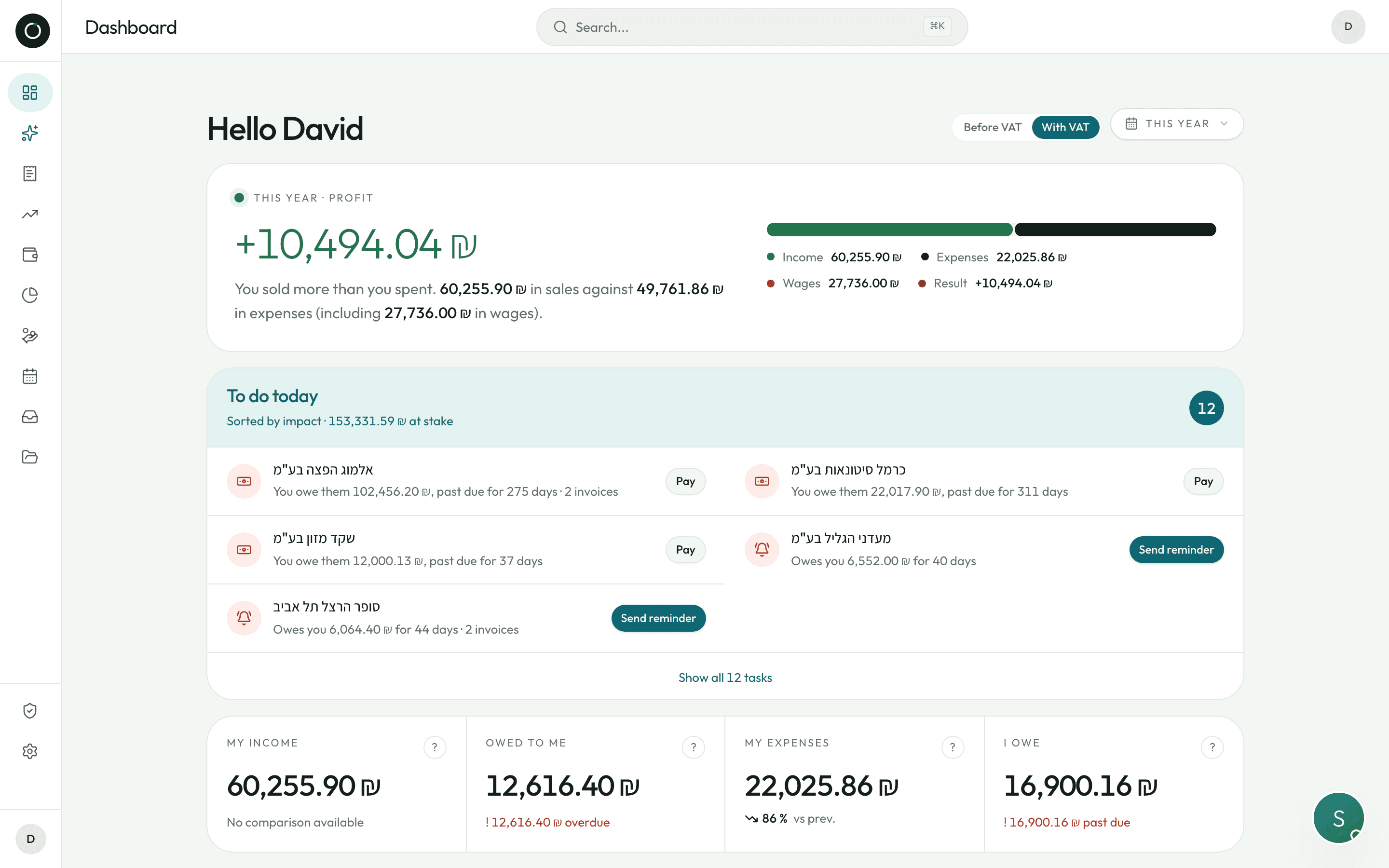
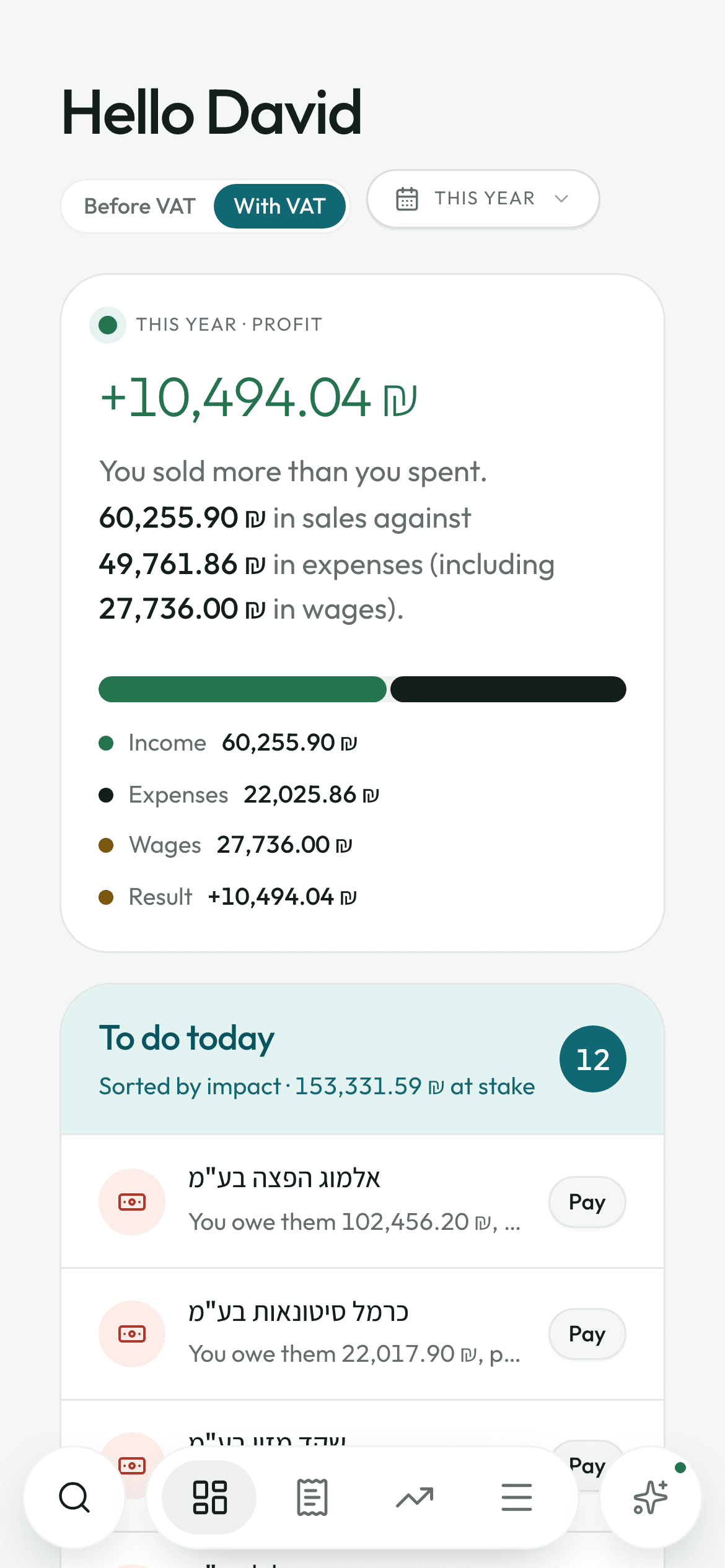
At the top, one big number: what you sold minus what you spent, wages included, with a sentence that explains it in plain words. Just below it — before any of the figures — the list of what needs doing, sorted by what it is worth in shekels.
- Every line has its button: Chase, Pay, Check, Add
- Four boxes — My income, Owed to me, My expenses, I owe — and a “?” that explains every calculation
- The calendar answers before the weekend: what has to go out, what should come in over the next seven days
What I owe
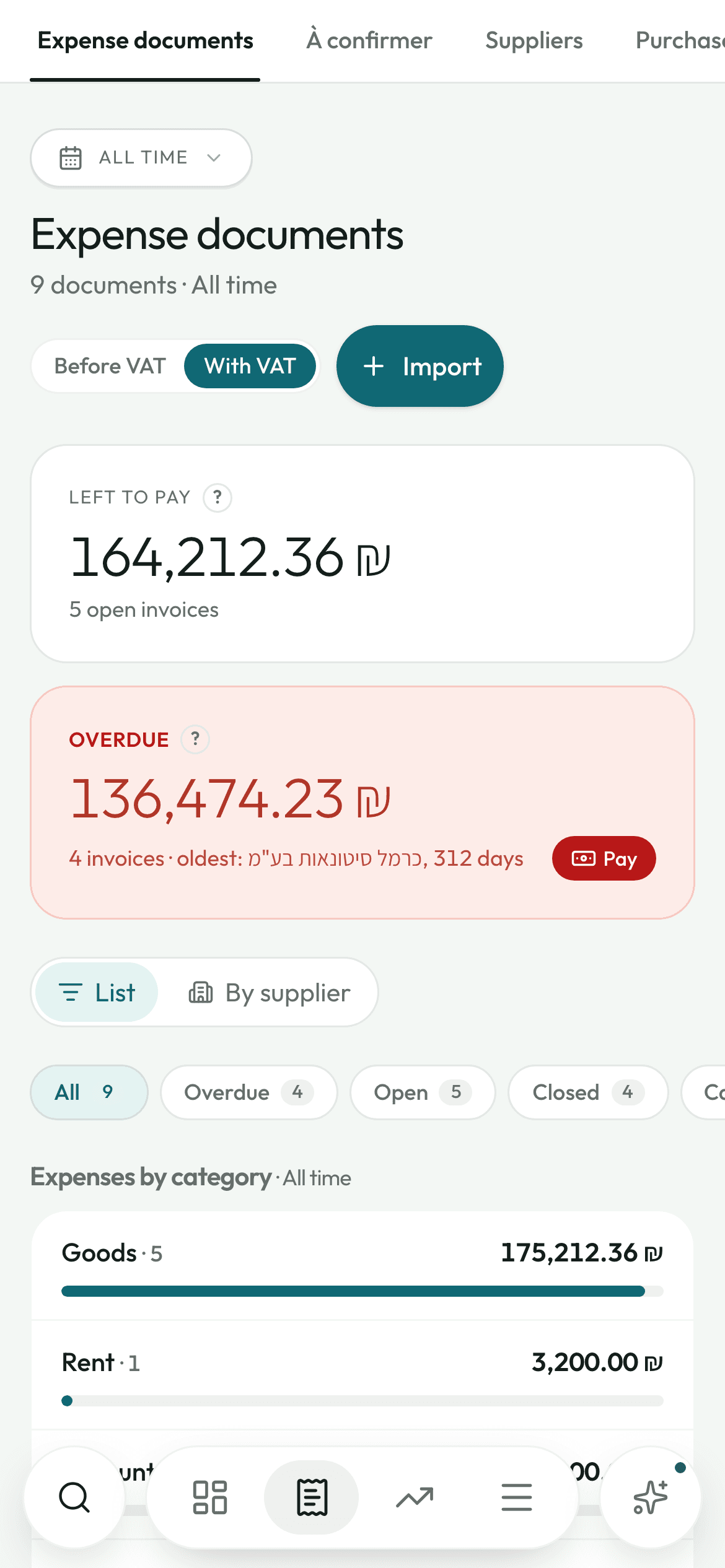
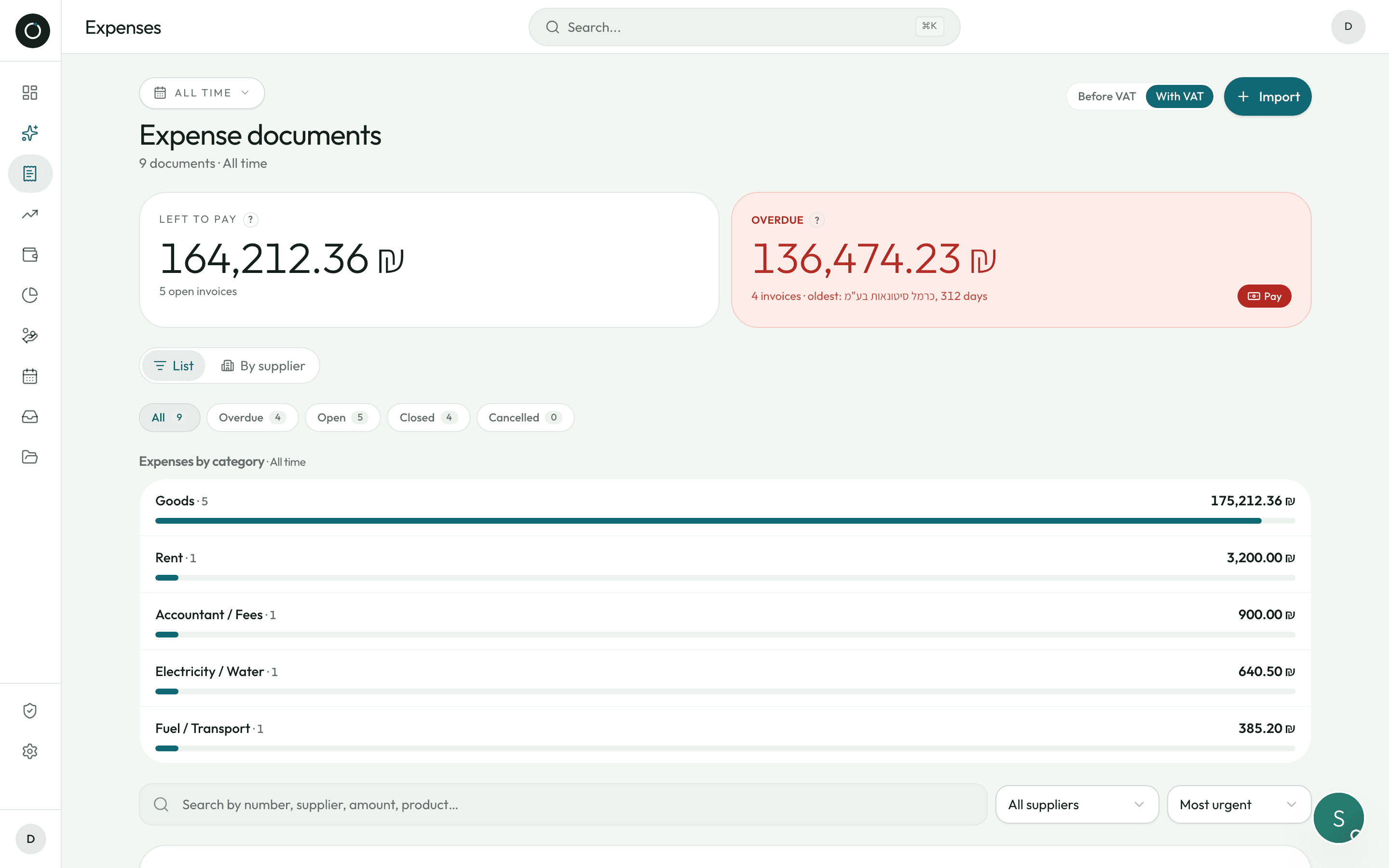
How much I owe, to whom, and since when.
Your supplier list is not an alphabetical directory: it is sorted by what you owe each one, with a badge — Up to date / Due soon / Overdue. And every supplier has an account statement, kept like a bank statement.
- The account statement (כרטסת) as real A4 pages, ready to send on WhatsApp
- A bank transfer is split across the oldest invoices on its own
- “Check the כרטסת”: photograph the statement they send you and the app pulls out the invoices missing on your side
The evening
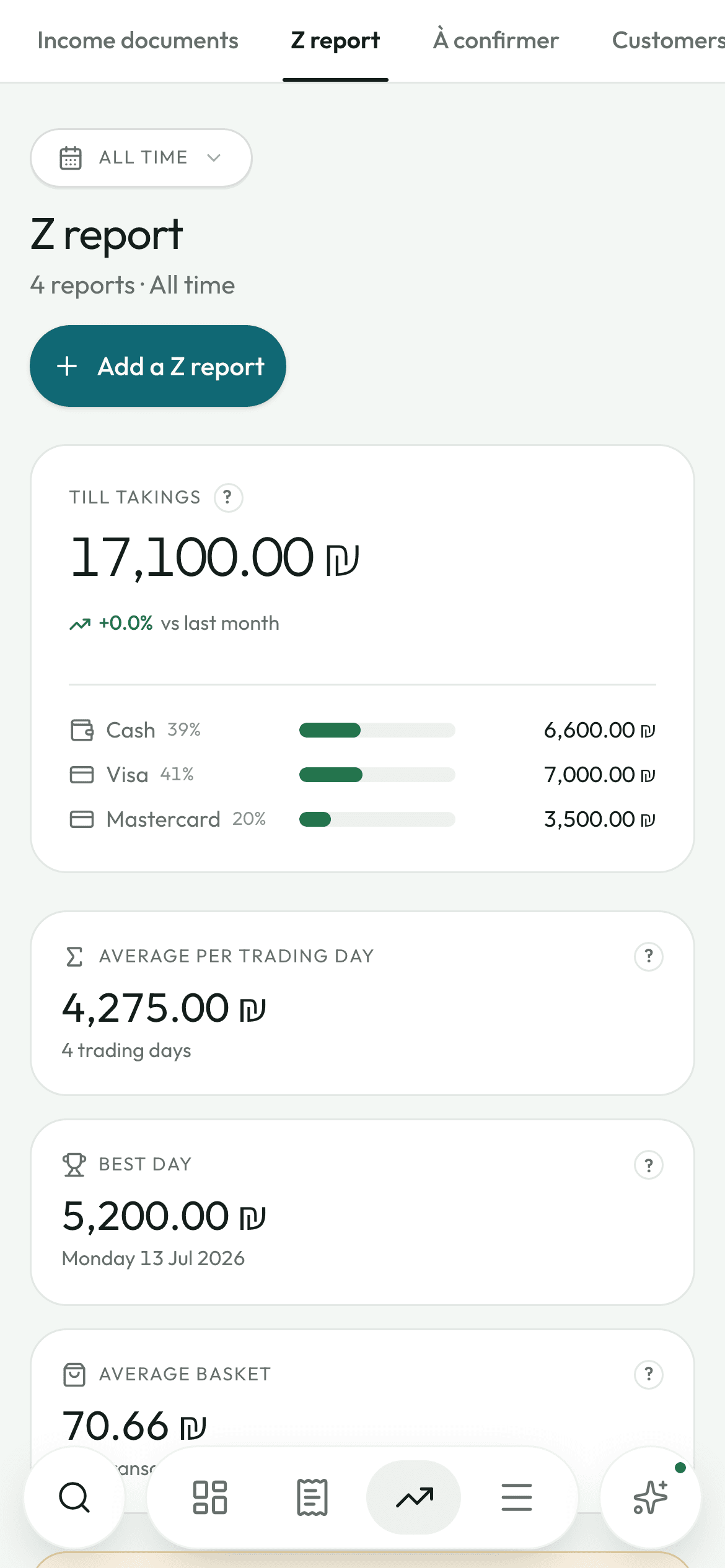
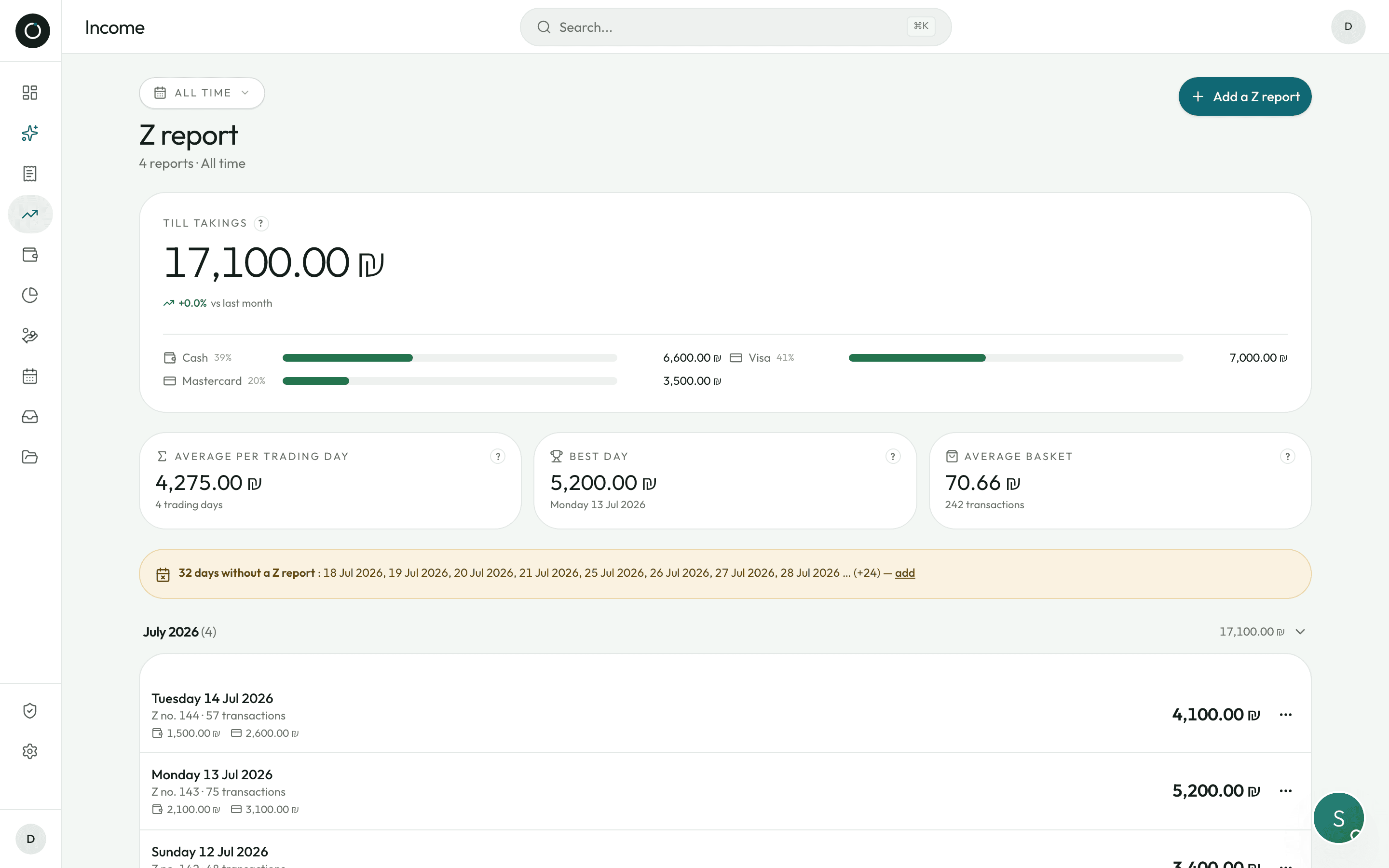
The evening Z, and what is really left in the drawer.
Photograph the end-of-day slip: the Z number, the date, the total, the amount before VAT, the VAT, the number of transactions and the split between cash (מזומן), Visa and Mastercard are already filled in. The cash balance is never typed in: it rebuilds itself.
- Days with no Z report are flagged — and the app works out your opening days from your own history
- For a bank deposit, you tick what you are taking to the bank instead of typing an amount
- Before you confirm: “After this deposit, ₪840 will be left in the till”
Your prices
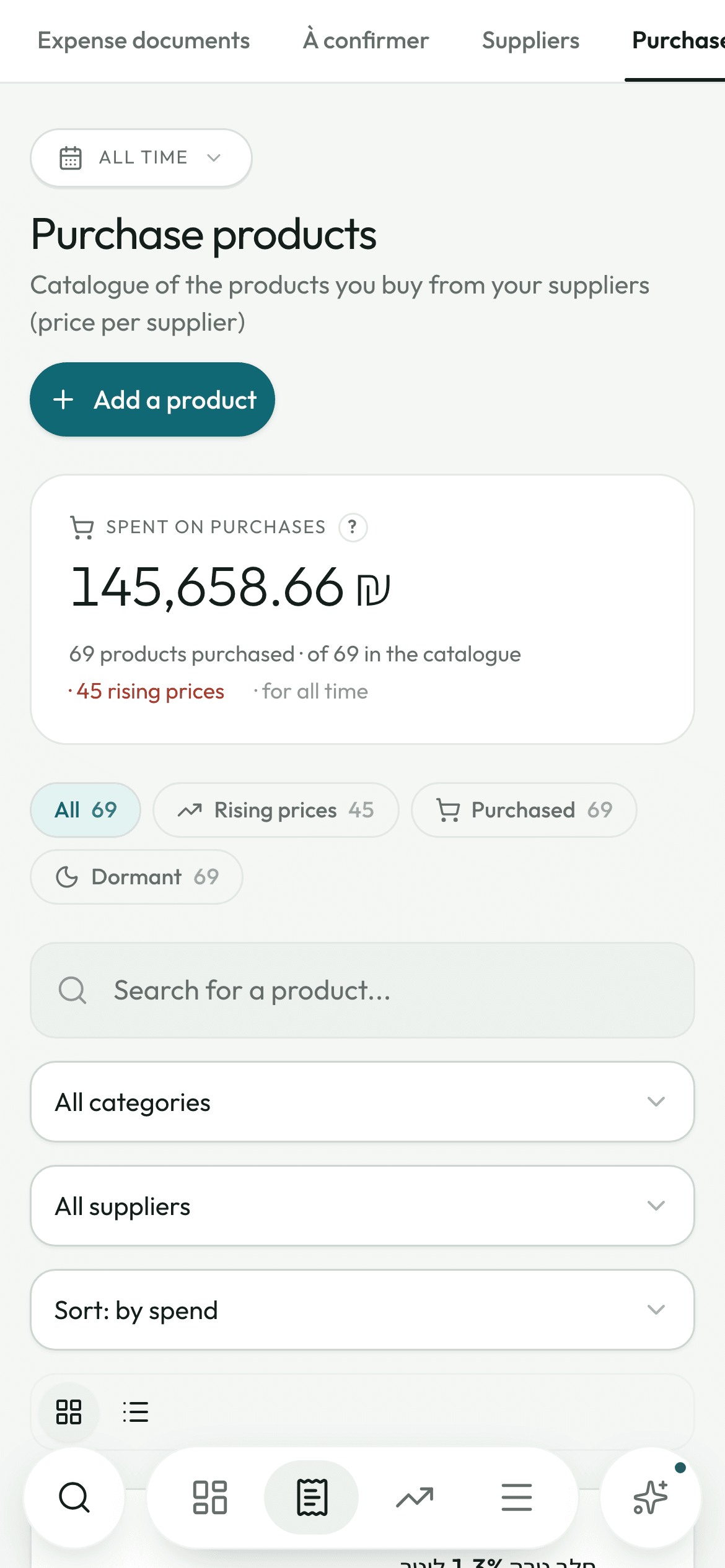
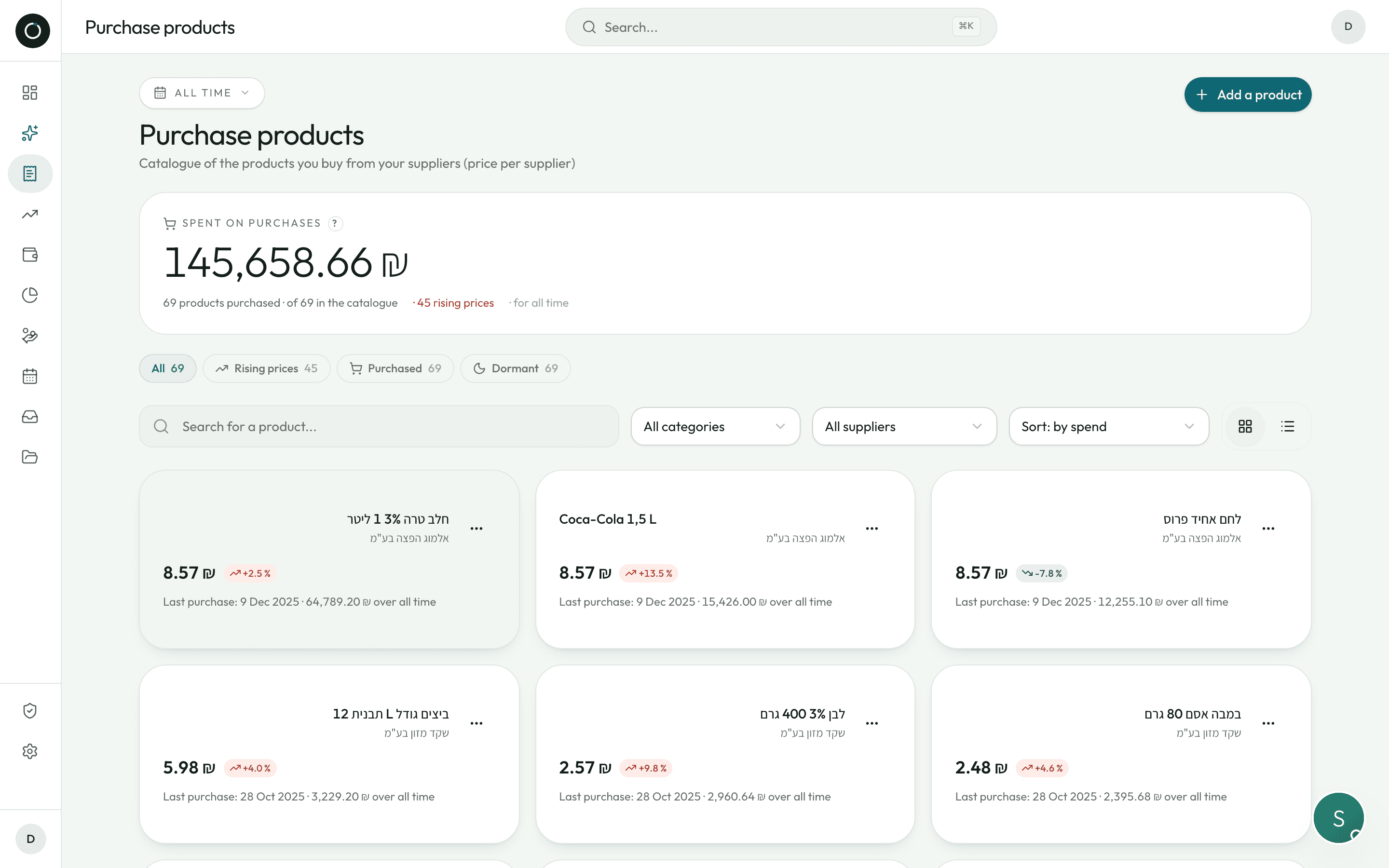
They've put their prices up again. Now you know by how much.
Every invoice you confirm writes the history of your prices: how much, from whom, on what day, on which invoice. And when a price goes up, the app doesn't show you an abstract percentage — it works out what it costs you per month, from what you actually buy.
- “Purchase price +12% · ₪340 more a month”, sorted from the most expensive to the least
- The same item at two suppliers, ranked from cheapest to most expensive
- “Fixed price”: enter the price you negotiated, and a badge lights up as soon as an invoice strays from it
Your assistant
Her name is Sarah,
and she is the one who does the paperwork.
You hand her your papers, she takes care of them. The decisions stay yours: nothing is saved, paid or sent without you.
- She reads your invoices and fills the form in for you
- She checks her own arithmetic again and shows you what she corrected
- She tells you what needs doing today, sorted by what it is worth
- She answers your questions about your own figures, whenever you want

Give me your invoices. I'll take care of the rest.
And everything else that comes with it.
The same move — taking a photo — covers the rest of the paperwork a shop has to deal with.
Your documents in your own Drive
One folder per supplier, one per customer, plus Z reports, Credit notes, Payslips and Archives — all created on their own. One page to find any of it again, with the viewer built in.
Your own import address
An email address of your own, something like delices-market@docs.hechbonit.com. Your suppliers send to it, and the document has already been read by the time you open the app. Only senders you approve can drop anything there.
The summary for your accountant
One email a day, a week or a month, with the list of expenses and income and the originals attached. Off by default: you are the one who turns it on.
Payslips
A filing cabinet with a brain. The app copies the payslip out without ever recalculating a figure, explains every line, and adds up the employer cost from the month's summary (תמחיר).
Where my money goes
A pie chart of your expenses by category — goods, rent, electricity, fuel, insurance — and every slice unfolds into the invoices behind it.
What you're owed
Your customers sorted by what they owe you, with the days overdue, and a button that opens WhatsApp with the reminder already written. You are the one who presses send.
Duplicates blocked
Caught in the queue, before you check the document, and again when it is saved — even when the number was misread. You don't pay the same invoice twice.
Sarah, your assistant
“Who do I buy the most from?”, “which invoices are overdue?”, “find me Cohen”. She searches your invoices, your suppliers, your customers and your products.
Return notes
A return note (תעודת החזרה) for anything that wasn't delivered or has to go back, with the reason and the quantity, shareable with the supplier as a PDF.
One search box
⌘K on a computer, the magnifier on a phone: your expenses, your income, your suppliers, your customers and the products you buy, all at the same time.
In the shop
Standing up, one hand on your phone,
the other on the invoice.
This is not a desktop program that has been shrunk down. Every detail below is a decision made for the counter.
A scanner like the one in Notes
Four corner handles AND four edge handles, a magnifier that follows your finger, and the perspective straightened out when you confirm. On Android, an “Auto flash” button turns the light on just before the shot — one tap turns it off.
Never stuck
If the browser's camera is blocked — WhatsApp, Instagram — a button switches over to the phone's own camera. If it can't read the document, “Enter it by hand” opens the form straight away.
The bottom bar
A magnifier on the left, the navigation in the middle, Sarah on the right: both round buttons sit where your thumb lands. The tab lights up as you press, before the page has even finished loading.
Lists remember
Your period, your filters, your sort order and the exact spot you were at. You open an invoice, you come back: nothing has moved.
Panels come up from the bottom
Menu, product picker, date picker: a handle at the top, closed with a flick of the thumb. No lag when you tap.
On your home screen
Add Hechbonit to your home screen from the browser: it opens full screen, with no address bar. Light mode and dark mode.
A single plan
₪99 a month. That's it.
Your first 14 days are on us, no credit card needed: clear this week's pile with your own real invoices, then decide. Unlimited invoices — that is our launch offer.
- Scanning your expenses and your income
- Supplier and customer balances, what is overdue, what falls due
- Account statements (כרטסת) in PDF, ready to send
- Z reports, cash and bank deposits
- Price tracking, with alerts that give you the figures
- Payslips for your employees
- Filing into your own Google Drive
- Sarah, on every screen
14 days on us · No credit card · Then ₪99 a month
No commitment, cancel any time · See the full pricing
The questions we get asked.
Which documents can Sarah read?
The ones you get every day: חשבונית מס, חשבונית מס קבלה, קבלה, חשבונית זיכוי, תעודת החזרה, the evening דוח Z, and payslips. Sarah reads every language, including several of them on the same document. Every word is copied letter by letter, never swapped for a word that would look more plausible, and every line is read a second time close up. Product names, the ח.פ, the allocation number (מספר הקצאה), the agorot rounding: every one of them is read and put in the right place.
Does it replace my accountant?
No, and it isn't meant to. It gets the work ready for them: your documents are filed, your originals sorted by supplier and by customer, and they get a summary by email with the attachments — every day, every week or every month, whichever you choose, instead of a plastic bag at the end of the quarter.
Do I issue my sales invoices with Hechbonit?
No, and that is on purpose. Keep the software that issues your invoices. Hechbonit deals with the pile that comes in: what you buy, what you collect, what you are owed. Your sales invoices you photograph like the rest, once they have been issued, so your customer balances are right.
And if Sarah misreads a figure?
She checks every calculation again, corrects what looks like a misreading and shows you in green what she changed. Anything still doubtful is listed with its line number, and the supplier, the number, the date and the totals each carry a dot: reliable / worth a check / unsure. The document is shown right above, everything can be edited, and nothing is saved unless you approve it. If it can't read the document at all, entering it by hand is one button away.
Where are my documents?
In YOUR Google Drive, in folders created automatically: Suppliers, Customers, Z reports, Credit notes, Payslips, Archives — with a subfolder for each supplier and each customer. The app only ever sees what it filed there itself: not your photos, not your other folders, not your mail. You get to them without us.
What if my supplier sends everything by email?
Give them your Hechbonit address, something like delices-market@docs.hechbonit.com: their documents land in “To sort out”, already read by the time you open the app. Only senders you approve can drop anything in there.
I'm not comfortable with computers.
A guided tour shows you the dashboard in thirty seconds and ends on your first invoice. Checking a document happens one screen at a time, with the document above it. And every figure that matters carries a small “?” that explains where it comes from, in plain words.
Does it work on my phone?
Yes, and that is where it is at its best: the whole thing was thought out for someone with a phone in one hand and a box in the other. Open the site and add Hechbonit to your home screen: it opens full screen, like an app. The same account works on your computer too, on as many devices as you like.
How long does it take to get started?
As long as it takes to photograph your first invoice. Three things about your business — the name, the ח.פ / מספר עוסק number and your VAT status (עוסק מורשה, עוסק פטור or חברה בע״מ) — and you're ready to go. You connect your Google Drive, and your originals start filing themselves.
What happens after the 14 days?
₪99 a month, one plan with everything in it, unlimited invoices. Cancel any time. And if you stop, your documents are already with you, in your own Drive.
The question you ask yourself ten times a day.
She already has the answer.
Try it on your own real invoices. You'll see in a minute whether Hechbonit knows your paperwork.
14 days on us · No credit card · Then ₪99 a month
Already have an account? Log in