Your prices
They've put their prices up again. Now you know by how much.
You never type a catalogue in. Every invoice you confirm writes the story of your prices: how much, from whom, on what day, on which invoice. And when a price goes up, the app does not hand you an abstract percentage: it works out what that costs you a month, from what you actually buy.
The catalogue writes itself
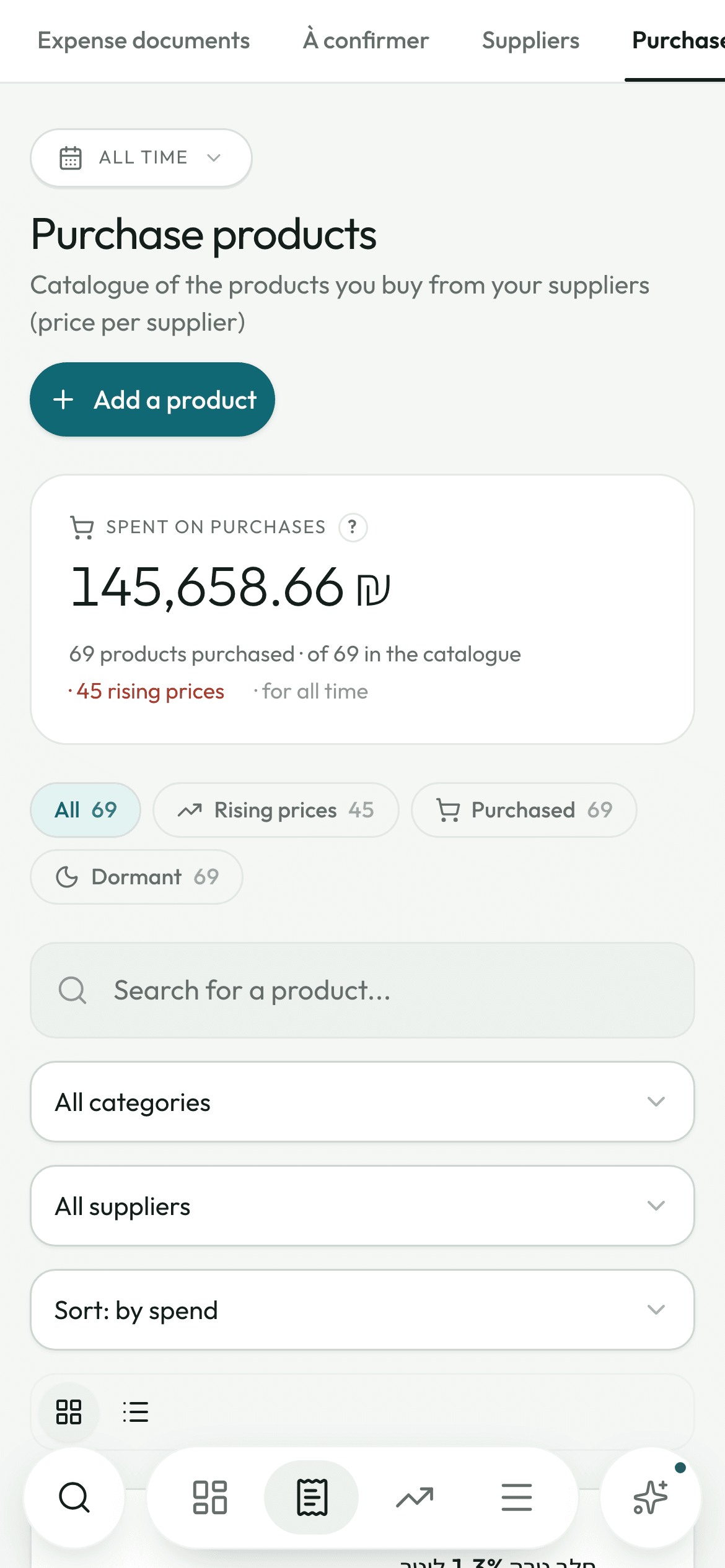
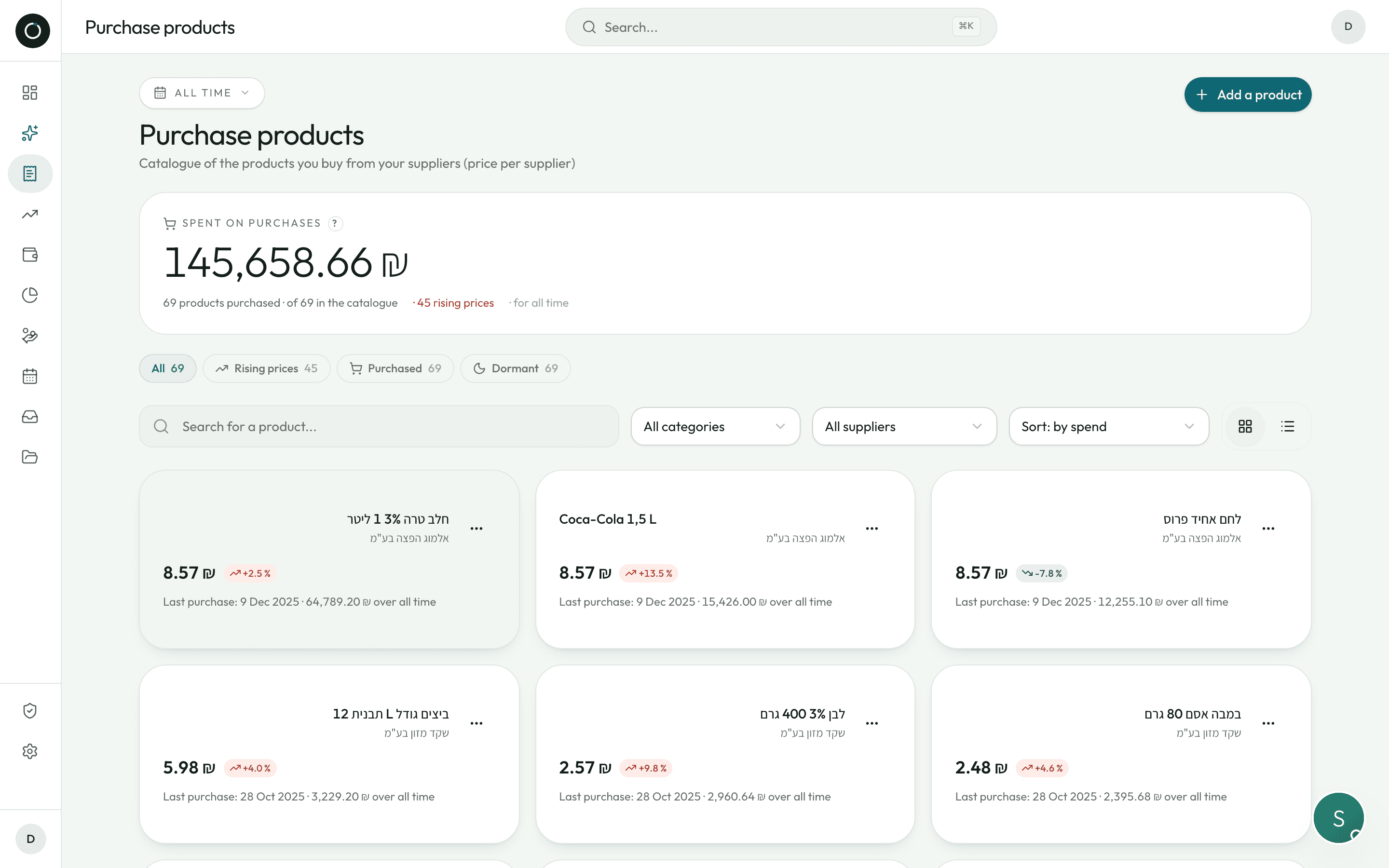
When you save an invoice, every line either matches a product you already have or creates its record: name, item code, barcode, price, supplier. And a line of history is written with the date and the invoice number.
- Every price keeps its proof: one click opens the invoice it came from
- Two entirely separate catalogues, what you buy and what you sell — purchase prices and selling prices never mix
- A credit note (זיכוי) never sets a price: goods sent back do not make it look as though the price has changed
- The average price is weighted by quantity, with the range beside it: “from ₪8.90 to ₪12.40”
- A product with no movement for six months is marked “dormant”, so you can clear it out
- Four chips filter the list in one click: All · Rising prices · Bought · Dormant
The alert comes in shekels a month
The app compares the last two prices you paid and works out what it really costs: the gap multiplied by what you actually buy. A rise caught early is money you never pay.
- “Purchase price +12% · ₪340 more a month”, in “To do today”, the costliest rise first
- A badge warns you at the very moment you check the invoice: “+12% · last ₪13.50”
- “Fixed price”: enter the price you negotiated, and a badge shows up as soon as an invoice moves away from it — “Fixed price ₪12.00 · +25%”
- On a brand-new product, you set that fixed price while you check the document, from a single chip
- A curve shows how the price has moved over time, with the supplier named as you hover
- No false alarms: a previous price of zero or below is simply ignored
The same item from two suppliers
Link the two records into one “family”: the product page then ranks them cheapest first, each under the exact name it carries at that supplier.
- The gap in shekels and as a percentage, plus a “cheapest” badge
- The date of every price is shown, and past six months: “old, worth checking”
- Linking two products merges their families without ever breaking a link already made
- If two products stay tied together by the same barcode, the app tells you and explains what to do
- A panel gives the latest price from each supplier — or from each customer on the income side
Two products are never confused
Béarnaise and tartare, 33 cl and 50 cl: two products with names this close must never end up merged, or the whole price history turns false. The rule is strict.
- Only an identical barcode links an item to a catalogue record on its own
- An identical item code, or a name identical character for character, raises nothing more than a suggestion for you to confirm — with the codes from both sides shown next to each other
- The app never links two products because their names look alike
- When a product is recognised for certain, its official name replaces the badly scanned wording, and the text read off the invoice stays on screen so you can check it
- Picking a product by hand brings over its name and its codes — never its quantity or its price, which come from the document
- Every invoice fills in the codes a record was missing: the app gets sharper for the next one
On the income side, the same thing in reverse
The selling history records the price you charged each customer, with the date and the invoice.
- Selling higher is good news: the colours follow your interest, not the direction of the arrow
- As you enter a sale: “+12% · last ₪45.00”, in green when you are selling higher
- The picker shows only the products already sold to that customer, at the price you gave them
- The top five products appear on a customer's page and on a supplier's page
Good to know
- A banner flags “N identical purchases on the same day, at the same price and the same quantity”: it may be normal, or a double import worth a look.
- Changing a product's reference price never rewrites the history of your invoices.
- On the product page: enter the price of the case and the number of units, and the app keeps the price per unit.
- No empty charts: when only one price is known, the app says so and tells you when the graph will appear.
- Deleting a product from the catalogue never touches your accounting documents.
- Cards or table view, search by name, item code or supplier, and the screen remembers how you left it.